2-1) JAVA 정리
▶Lecture 2
hello world
public class Welcome {
	public static void main(String[args]) {
		System.out.println("Welcome to Java!");
	}
}
C언어와 다르게 class 안에 함수들이 들어있는 구조
class 명은 해당 파일 명과 이름이 같아야 함
java : public static void main = C : int main
java : System.out.println = C : printf
주석
- // : 한줄 주석
- /* … */ : 블록 주석
▶Class
- 선언
- 접근 제어자 : public, protected, private
- extends로 상속, implements로 인터페이스 지정 가능
접근제어자 class 클래스이름 extends 부모클래스 implements 인터페이스 {
	//필드
	//생성자
	//매서드
	//초기화 블럭, 내부 클래스
}- 필드
- 클래스가 보유한 데이터를 저장하는 변수
private String name; // 인스턴스 변수
public static final int MAX_COUNT = 100; // 클래스 변수- 생성자
- 객체가 생성될 때 호출되는 메서드
- 클래스명과 동일함
- 필요에 따라 매개 변수를 받는 생성자 정의 가능
public MyClass() {}  // 기본 생성자
public MyClass(String name) {this.name = name;} //매개변수를 받는 생성자- 메서드
- 클래스 기능 정의
- main 메서드는 해당 프로그램의 흐름을 관리함
public void setName(String name) {
	this,name = name;
}

public String getName() {
	return this.name;
}

...- 인스턴스화(객체 생성)
- 실제 동작 가능한 객체는 new 연산자를 사용하여 만듦
- 생성된 객체는 해당 클래스의 필드와 메서드 이용 가능
MyClass obj = new MyClass("송준우");메세지 박스 띄우기
- JOptionPane 사용
JOptionPane.showMessageDialog(null,
 "Welcome to Java!", "Example 1.2",
 JOptionPane.INFORMATION_MESSAGE);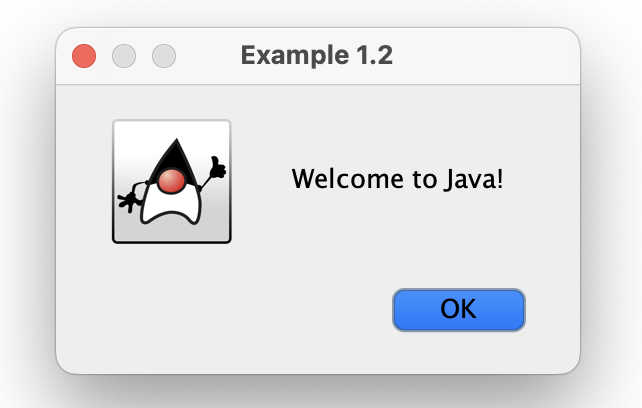
▶Lecture 3
식별자 (Identifiers)
- 자료형 : int, double, char, …
- 문자, 숫자, _ (언더바),$ 사용 가능 (숫자로 시작 불가)
- true, false, null 이름으로 사용 불가
int x;
int y = 1;
char z = 'j';
상수
- final : 상수 정의
final int SIZE = 3;타입별 비트수
byte : 8 bits
short : 16 bits
int : 32 bits
long : 64 bits
float : 32 bits
double : 64 bits
연산자 (Operators)
- +, -, *, /, %
- C와 동일
- +=, -=, *=, /=, %=, ++, —
- C와 동일
타입 변경
byte i = 100;
long k = i*3+4; //됨
double d = i*3.1+k/2; //됨
int x = k; //안됨
int y = d; //안됨
int k = x; //됨
Char
char letter = 'A'; //아스키 코드로 저장
char letter = '\u0041'; //유니 코드로 저장

char tab = '\t'; //탭 (1글자)
/*
	\b : 백스페이스
	\n : 줄바꿈
	\r : 같은 줄 맨 앞부터 덮어쓰기
*/
Boolean
boolean a = true;
boolean b = false;
boolean c = (1 > 2); //false 저장
비교 연산자
- C와 같음
Boolean 연산자
! : not
&& : and
|| : or
^ : xor
메세지 박스에 입력 넣는법
- JOptionPane 사용
String string = JOptionPane.showInputDialog(
	null, "Prompt Message", "Dialog Title",
	JOptionPane.QUESTION_MESSAGE);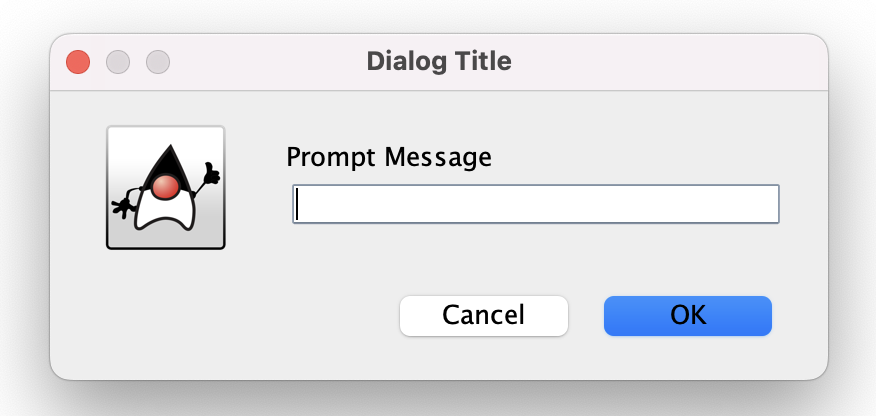
정수 문자열을 정수로 바꾸기
- Integer.parseInt tkdyd
int intValue = Integer.parseInt(integerAsString);part 2의 제어, 반복문은 C와 완전히 똑같음
▶Lecture 4
Method
- C에서의 함수라고 생각하면 편함
- 장점 : 한 번 작성시 여러번 사용 가능
public static int max (int num1, int num2) {

	int result = 0;

	if(num1 > num2) result = num1;
	else result = num2;

	return result;
}public static void main(String[] args) {
int i = 5;
int j = 2;
int k = max(i,j); // max 메서트의 num1에 i 전달, 2에 j 전달
}Method Overloading
- 같은 이름의 입력 매개변수의 타입만 다른 함수는 정의 가능
public static int max(int num1, int num2)
public static int max(double num1, double num2)
// 둘 다 정의 가능
public static int max(int num1, int num2)
public static double max(int num1, int num2)
//정의 불가능

public static int max(double num1, int num2)
public static int max(int num1, double num2)
// Ambiguous Invocation : 정의 불가능
지역 변수와 전역 변수
- C와 같음
재귀 함수
- 자기 자신을 다시 호출하는 함수
public static int sum (int x) {
	if(x > 0) return x + sum(x - 1);
	else return 0;
}
//sum 안에서 sum이 호출됨
Java Math Class
- Class constants : PI, E
- Exponent methods : java
exp(double a) // 제곱 log(double a) // 로그 pow(double a, double b) // a의 b승 sqrt(double a) // 제곱근 - Rounding methods :java
ceil(double x) // 올림 floor(double x) // 내림 rint(double x) // 가까운 정수 , 같으면 짝수 round(float x) // 반올림(int) round(doiuble x) // 반올림(long) - 그 외 :java
max(a,b)
min(a,b)
abs(a)
random()
sin(double a)
cos(double a)
tan(double a)
acos(double a)
asin(double a)
atan(double a)
▶Lecture 5
Class
- 속성(Properties) = Attributes (데이터 필드)
- 동작(Methods) = Functions (함수)
그냥 예시를 드는게 나을듯
class Circle {
  double radius;

  double area(){
    return radius * radius * 3.14159;
  }
}
이런 식으로 Circle에 대한 변수들이나 함수들을 하나로 묶어놓은 것이 Class
- Objects (객체)
- 클래스를 인스턴스화하면 객체라고 부름, new를 통해 생성
ClassName objectReference;

Circle myCircle; // 객체 참조 변수 선언

objectReference = new ClassName();

myCircle = new Circle(); // 객체 생성

ClassName objectReference = new ClassName();
Circle myCircle = new Circle(); // 한 번에 생성- 객체 접근 방법
- 데이터 : java
objectReference.data - 메서드 : java
objectReference.method()
- 데이터 :
- 생성자
Circle(double r) {
	radius = r;
} // 매개변수를 받아 반지름을 설정하는 생성자

Circle() {
	radius = 1.0;
} // 매개변수가 없을 때 기본 반지름을 1.0으로 설정하는 생성자

myCircle = new Circle(5.0);
// 첫번째 생성자 호출 --> 반지름 : 5.0
myCircle = new Circle();
// 두번째 생성자 호출 --> 반지름 : 1.0- public : 어느 패키지에서나 사용 가능
- private : 선언된 클래스 안에서만 사용 가능
- static 변수 : 클래스당 하나만 생성됨
- this : 객체 자신을 가리킴
▶Lecture 6
- Superclass와 Subclass
- Circle을 기반으로 Cylinder와 Sphere도 만들 수 있음
- Superclass(상위 클래스) : circle
- Subclass(하위 클래스) : Cylinder
- 하위 클래스는 상위 클래스의 속성과 매서드를 모두 상속받음
public class Cylinder extends Circle {

	private double length; // 추가적인 속성 생성

	public double findVolume() {
		return radius * radius * length * 3.14;
	} // 실린더 부피 계산 메서드 생성
}- 메서드 오버라이딩
- 상위 클래스의 메서드를 하위 클래스에서 재정의
@Override
public double findArea() {
	// definition 변경
} // 겉넓이 계산 함수- Superclass 메서드 사용
- 위의 findVolume 함수를 이런 식으로도 사용 가능
- 오버라이딩은 해당 속성, 메서드가 접근 가능해야 사용 가능 (private 사용 불가)
public double findVolume() {
	return super.findArea() * length;
} // superclass인 Circle의 넓이 (원의 넓이) 계산 함수 사용- 상위 클래스 호출 방법
- 맨 윗줄에 super 호출
- 없다면 JVM이 자동으로 호출 (암묵적)
public class B extends A {
	super()
}public class C1 extends C2 {
public C1() { System.out.println("C1 생성자"); }
}
class C2 extends C3 {
public C2() { System.out.println("C2 생성자"); }
}
class C3 {
public C3() { System.out.println("C3 생성자"); }
}
public static void main(String[] args) {
new C1();
}
// 출력 순서 : c3 --> c2 --> c1 순서- java Object class 의 기본 내장 메서드
- equals() vs ==
- == : 변수나 참조 비교
- equals() : 객체 내용 비교
- 비교를 위해서는 클래스별로 equals를 재정의해야 함
public boolean equals (Object obj) {
	return (this == obj);
}- 예시
import java.util.Objects;

public class Person {
    private String name;
    private int age;

    // 생성자
    public Person(String name, int age) {
        this.name = name;
        this.age = age;
    }

    // equals() 오버라이드: 내용 비교
    @Override
    public boolean equals(Object obj) {
        // 1) 자기 자신과 비교
        if (this == obj) {
            return true;
        }
        // 2) null, 타입 불일치 체크
        if (obj == null || getClass() != obj.getClass()) {
            return false;
        }
        // 3) 실제 필드 비교
        Person other = (Person) obj;
        return age == other.age &&
               Objects.equals(name, other.name);
    }

    // equals()를 오버라이드하면 hashCode()도 함께 오버라이드하는 것이 권장됩니다.
    @Override
    public int hashCode() {
        return Objects.hash(name, age);
    }

    public static void main(String[] args) {
        Person p1 = new Person("홍길동", 20);
        Person p2 = new Person("홍길동", 20);
        Person p3 = new Person("이몽룡", 20);

        System.out.println(p1.equals(p2));  // true: name·age가 같으므로
        System.out.println(p1.equals(p3));  // false: name이 다름
        System.out.println(p1 == p2);       // false: 서로 다른 객체 참조
    }
}
- toString()
- 객체를 문자열로 표현해주는 메서드
public class Person {
    private String name;
    private int age;

    public Person(String name, int age) {
        this.name = name;
        this.age = age;
    }

    // toString() 오버라이드: 객체를 문자열로 표현
    @Override
    public String toString() {
        return "Person{name='" + name + "', age=" + age + "}";
    }

    public static void main(String[] args) {
        Person p = new Person("홍길동", 20);
        System.out.println(p);
        // 출력: Person{name='홍길동', age=20}
    }
}
- clone()
- 객체를 복제하는 메서드
- 복제하려면 Cloneable 인터페이스 구현 필요
public class Person implements Cloneable {
    private String name;
    private int age;

    public Person(String name, int age) {
        this.name = name;
        this.age = age;
    }

    // clone() 오버라이드: 깊은 복제가 아니므로
    // 단순 필드 복제를 위해 super.clone() 호출
    @Override
    public Person clone() {
        try {
            return (Person) super.clone();
        } catch (CloneNotSupportedException e) {
            // 보통 여기로 오지 않음 (Cloneable 구현했으므로)
            throw new AssertionError(e);
        }
    }

    @Override
    public String toString() {
        return "Person{name='" + name + "', age=" + age + "}";
    }

    public static void main(String[] args) {
        Person original = new Person("이몽룡", 25);
        Person copy     = original.clone();

        System.out.println(original); // Person{name='이몽룡', age=25}
        System.out.println(copy);     // Person{name='이몽룡', age=25}

        System.out.println(original == copy);       // false: 서로 다른 인스턴스
        System.out.println(original.equals(copy));  // true  (앞서 equals()를 구현했다면)
    }
}
▶중간고사 기출
1.
Write the output of the following code.
int K = 9;
int j = 1;

while (k % 5 != 0) {
    if (j % 2 == 0)
        K = K + 1;
    if (k % 3 == 0) {
        j = j + 3;
        continue;
    }
    System.out.println("(" + j + "," + k + ")");
    j--;
}
2.
Given the following variables, evaluate each expression.
int i = 3;
int j = 125;
int k = 7;
double d = 7.0;| 식 | 결과 |
|---|---|
d / 2 | |
k / 3 | |
++k - i * 2 | |
(i != j) == (i != k) | |
j % 6 / 5 * 4 + i - 2 | |
i + 5 <= 10 || false | |
i == 0 ^ false | |
i != 3 || i == 3 && k != 7 |
3.
Create a Java class for the representation of a rectangle with the following requirements:
- Two attributes
heightandwidth - A method
calcArea()that returns the area of the rectangle - A default constructor that sets
heightandwidthto1.0 - A class attribute
numOfObjectsthat counts the number of objects created via the default constructor
예시 답안
public class Rectangle {
    double width, height;
    public static int numOfObjects = 0; // public modifier optional

    Rectangle() {
        this.height = 1.0;
        this.width = 1.0;
        numOfObjects += 1;
    }

    double calcArea() {
        return this.width * this.height;
    }
}
4.
The following program contains 8 errors. Find all these errors and give a short description of every error.
01  public class TestMax {
02
03      /**  Main method (Hmm... a very long comment!)
04      public static void main(String[] args) {
05          void i = 5;
06          int j=2
07          int k = max(i, j); // i and j must be of the same type
08          System.out.println("The maximum between " + i +
09              " and " + j + " is " + k);
10      }
11
12      /** Return the max between two numbers */
13      public static int mixx(int num1, num2)
14      {
15          int result;
16
17          if num1 > num2
18              result = num1;
19          else
20              result =a num2;
21
22          result; // deliver the value of result to the caller
23      }
24  }
5.
What is the output of the following code?
class B extends C {
    public B() {
        System.out.println("Constructor B");
    }
}

class C {
    public C() {
        System.out.println("Constructor C");
    }
}

public class A extends B {
    public static void main(String[] args) {
        new A(); new B(); new C();
    }

    public A() {
        System.out.println("Constructor A");
    }
}
6.
What value is returned by a method-call value(4) when the method is defined as follows:
public static int value(int i) {
    if (i >= 1)
        return i + i * value(i - 1);
    else
        return 0;
}
Follow the recursive computation-process and note down all intermediate steps
▶Lecture 7
Polymorphism
한 종류의 매개변수로 다양한 객체를 처리할 수 있는성질
class A {}
class B {}
class